Available in:
Post Affiliate Pro
, Post Affiliate Pro Ultimate
, Post Affiliate Network
What are Webhooks & Callbacks?
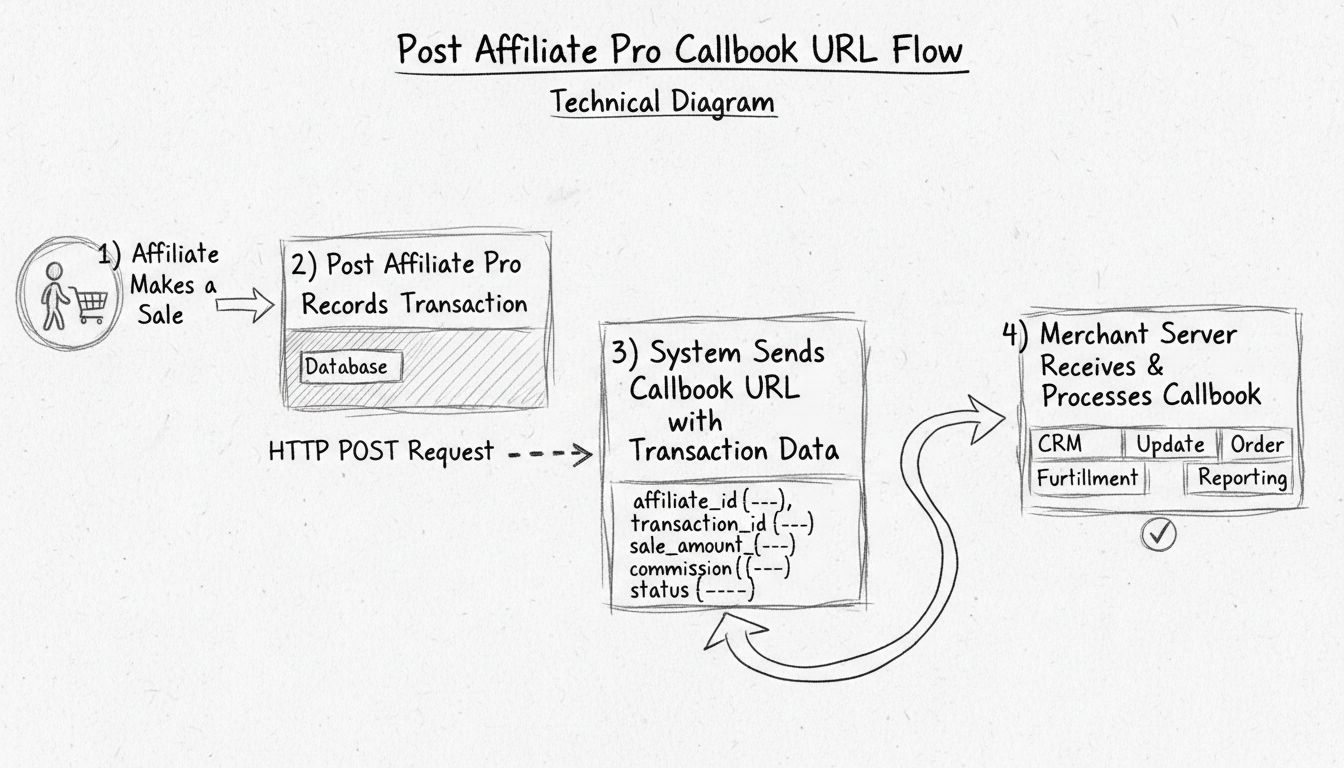
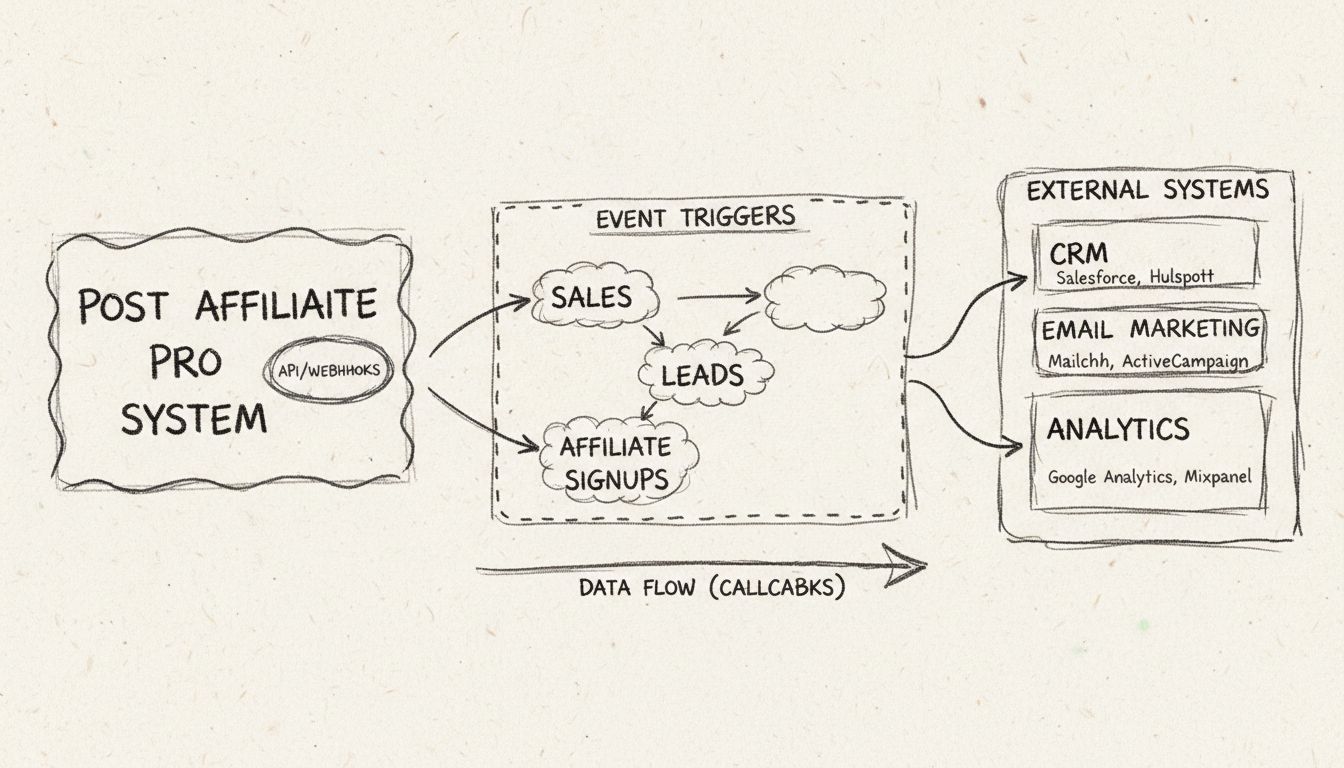
Webhooks (also called Application Callbacks or Postback URLs) are automated HTTP notifications that Post Affiliate Pro sends to external systems when specific events occur. Instead of constantly polling for updates, your connected systems receive instant notifications the moment something happens in your affiliate program.
This feature is essential for:
- CRM Integration - Automatically update your customer database when sales occur
- Email Automation - Trigger email sequences based on affiliate actions
- Accounting Systems - Sync transaction data with your financial software
- Custom Dashboards - Build real-time reporting dashboards
- Third-Party Tracking - Notify external tracking platforms of conversions
Types of Webhooks
Post Affiliate Pro supports two main types of webhooks:
Sale Tracking Webhooks
These webhooks are triggered by transaction-related events:
| Trigger Event | Description |
|---|
| On Create | Fires immediately when a new transaction (sale, action, lead) is recorded |
| On Approve | Fires when a pending transaction is approved |
| On Decline | Fires when a transaction is declined |
| On Refund/Chargeback | Fires when a refund or chargeback is processed |
You can configure a single webhook to fire on multiple events, or create separate webhooks for each event type.
Affiliate Signup Webhooks
These webhooks are triggered by affiliate registration events:
| Trigger Event | Description |
|---|
| On Register | Fires immediately when a new affiliate completes the signup form |
| On Approve | Fires when a pending affiliate is approved by a merchant |
Request Types
Post Affiliate Pro supports three HTTP request types for webhooks:
GET Request
Parameters are appended to the URL as query string parameters.
https://your-system.com/webhook?transactionid=abc123&commission=50.00&orderid=ORD-456
POST Request (Form-Urlencoded)
Parameters are sent in the request body using standard form encoding.
Content-Type: application/x-www-form-urlencoded

transactionid=abc123&commission=50.00&orderid=ORD-456
POST JSON Request
Parameters are sent as a JSON object in the request body.
Content-Type: application/json

{"transactionid": "abc123", "commission": "50.00", "orderid": "ORD-456"}
Available Variables for Sale Webhooks
You can use dynamic variables in your webhook URLs that are automatically replaced with actual values. Use the format ${#variablename#} to include a variable.
Transaction Data
| Variable | Description |
|---|
${#transactionid#} | Unique transaction identifier |
${#visitorid#} | Visitor ID (tracking cookie) |
${#commission#} | Commission amount |
${#totalcost#} | Total order value |
${#fixedcost#} | Fixed cost amount |
${#orderid#} | Order ID from your e-commerce system |
${#productid#} | Product ID |
${#dateinserted#} | Date and time the transaction was created |
${#dateapproved#} | Date and time the transaction was approved |
${#tier#} | Commission tier level |
${#status#} | Transaction status (Approved, Pending, Declined) |
${#statuscode#} | Status code (A, P, D) |
${#type#} | Transaction type (Sale, Action, etc.) |
Campaign and Banner Data
| Variable | Description |
|---|
${#campaignid#} | Campaign identifier |
${#campaignname#} | Campaign name |
${#bannerid#} | Banner identifier |
${#channel#} | Channel name |
${#channel_code#} | Channel code |
${#coupon_code#} | Coupon code used |
Affiliate Data
| Variable | Description |
|---|
${#userid#} | Affiliate user ID |
${#refid#} | Affiliate referral ID |
Click Data
| Variable | Description |
|---|
${#firstclicktime#} | First click timestamp |
${#firstclickreferer#} | First click referrer URL |
${#firstclickip#} | First click IP address |
${#firstclickdata1#} | First click custom data 1 |
${#firstclickdata2#} | First click custom data 2 |
${#lastclicktime#} | Last click timestamp |
${#lastclickreferer#} | Last click referrer URL |
${#lastclickip#} | Last click IP address |
${#lastclickdata1#} | Last click custom data 1 |
${#lastclickdata2#} | Last click custom data 2 |
Custom Transaction Data
| Variable | Description |
|---|
${#saledata1#} | Transaction custom data field 1 |
${#saledata2#} | Transaction custom data field 2 |
${#saledata3#} | Transaction custom data field 3 |
${#saledata4#} | Transaction custom data field 4 |
${#saledata5#} | Transaction custom data field 5 |
Geographic and Technical Data
| Variable | Description |
|---|
${#ip#} | IP address of the customer |
${#countrycode#} | Country code based on IP |
${#refererurl#} | Referrer URL |
Currency Data
| Variable | Description |
|---|
${#originalcurrency#} | Original currency name |
${#originalcurrencyvalue#} | Original currency value |
${#originalcurrencyrate#} | Exchange rate used |
Notes
| Variable | Description |
|---|
${#merchantnote#} | Note visible to affiliate |
${#systemnote#} | Note visible to merchant only |
${#actionName#} | Action commission type name |
${#actionCode#} | Action commission type code |
Available Variables for Signup Webhooks
For affiliate signup webhooks, you can use affiliate profile variables:
| Variable | Description |
|---|
${#username#} | Affiliate email/username |
${#firstname#} | Affiliate first name |
${#lastname#} | Affiliate last name |
${#name#} | Full name (first + last) |
${#userId#} | Affiliate user ID |
| Custom fields | Any custom profile field by its code |
Multi-Tier Support
By default, webhooks are executed only for tier 1 (direct) commissions. You can enable the “Execute for each tier” option to trigger webhooks for all tier levels in multi-tier commission structures.
This is useful when:
- You need to track commissions at all levels of your affiliate hierarchy
- Your external system needs to know about sub-affiliate earnings
- You’re building comprehensive reporting that includes all commission levels
Webhook Filtering Options
You can configure webhooks to be more specific:
By Commission Type
Limit the webhook to a specific commission type (e.g., only for “Premium Sales” action commissions).
By Affiliate
Create webhooks that only fire for a specific affiliate. This is useful for:
- Affiliates who use their own tracking systems
- Special integrations for top-performing affiliates
- Testing webhooks with a single affiliate before rolling out
By Account (Network Mode)
In Post Affiliate Network, you can create account-specific webhooks.
Webhook Log & Monitoring
Post Affiliate Pro maintains a comprehensive log of all webhook executions, accessible in the merchant panel under Tools > Callbacks Log.
The log shows:
- Log ID - Unique identifier for each webhook execution
- Callback ID - Which webhook configuration was used
- Request URL - The full URL that was called (with variables replaced)
- Date Created - When the webhook was queued
- Last Retry - When the last execution attempt was made
- Retry Number - How many times the system attempted to execute
- Status - Pending, Sent, or Error
- Error Message - Details if the webhook failed
Automatic Retry
If a webhook fails (e.g., your server is temporarily unavailable), Post Affiliate Pro will automatically retry the request. This ensures reliable delivery even during temporary outages.
Log Retention
Webhook logs are automatically cleaned up after a configurable number of days (default: 60 days). You can adjust this in Configuration > Features > Application Callbacks.
Webhook Management
Approval Workflow
By default, webhooks created by affiliates require merchant approval before they become active. Merchants can:
- Enable auto-approval - Automatically approve all new webhooks
- Manually review - Approve or decline each webhook individually
Status Management
Webhooks have three possible statuses:
- Approved - Active and will be executed when triggered
- Pending - Waiting for merchant approval
- Declined - Rejected and will not be executed
Merchants can change webhook status at any time from the webhooks management screen.
Email Notifications
Post Affiliate Pro can send email notifications for webhook-related events:
Merchant Notifications
- New webhook created by affiliate
Affiliate Notifications (Optional)
- Webhook status changed (approved/declined)
- Webhook modified by merchant
- Webhook deleted by merchant
These notifications can be enabled or disabled in Configuration > Email Notifications.
Example Use Cases
1. CRM Integration
Send new sale data to your CRM when a transaction is approved:
https://crm.example.com/api/sales?customer_order=${#orderid#}&value=${#totalcost#}&affiliate=${#refid#}
2. Slack Notification
Notify your team channel when a new affiliate signs up:
https://hooks.slack.com/services/xxx/yyy?text=New+affiliate:+${#firstname#}+${#lastname#}
Add customers to an email sequence after purchase:
POST https://email.example.com/api/subscribers
Body: {"email": "${#saledata1#}", "purchase_value": "${#totalcost#}"}
4. Accounting Software Sync
Record commission payments in your accounting system:
https://accounting.example.com/webhook?affiliate_id=${#userid#}&commission=${#commission#}&order=${#orderid#}
How to Set Up a Webhook
- Log in to your Merchant Panel
- Navigate to Configuration > Features
- Activate the Application Callbacks feature
- Go to Campaigns > [Select Campaign] > Callbacks or the global callbacks manager
- Click Add New Callback
- Configure:
- Name - A descriptive name for the webhook
- Type - Sale Tracking or Affiliate Signup
- Execution - When to trigger (on create, approve, decline, refund)
- Request Type - GET, POST, or POST JSON
- URL - Your endpoint with variables
- Execute for each tier - Yes/No
- Save the webhook
Security Considerations
- Use HTTPS endpoints for secure data transmission
- Consider adding a secret parameter to verify the webhook source
- Implement rate limiting on your receiving endpoint
- Validate incoming data before processing
- Keep webhook logs for auditing purposes
- S2S Tracking
- Server-to-server tracking for accurate conversions
- API
- Full programmatic access to Post Affiliate Pro
- API v3
- Modern RESTful API with OAuth 2.0