Available in:
Post Affiliate Pro
, Post Affiliate Pro Ultimate
, Post Affiliate Network
Overview
Post Affiliate Pro offers a comprehensive suite of advanced reporting tools that provide deep insights into your affiliate program’s performance. These reports go beyond basic statistics, offering granular time-based analysis, traffic breakdowns, channel performance metrics, sub-affiliate tracking, and financial summaries. All reports include flexible filtering options and can be exported for further analysis.
Hourly Reports
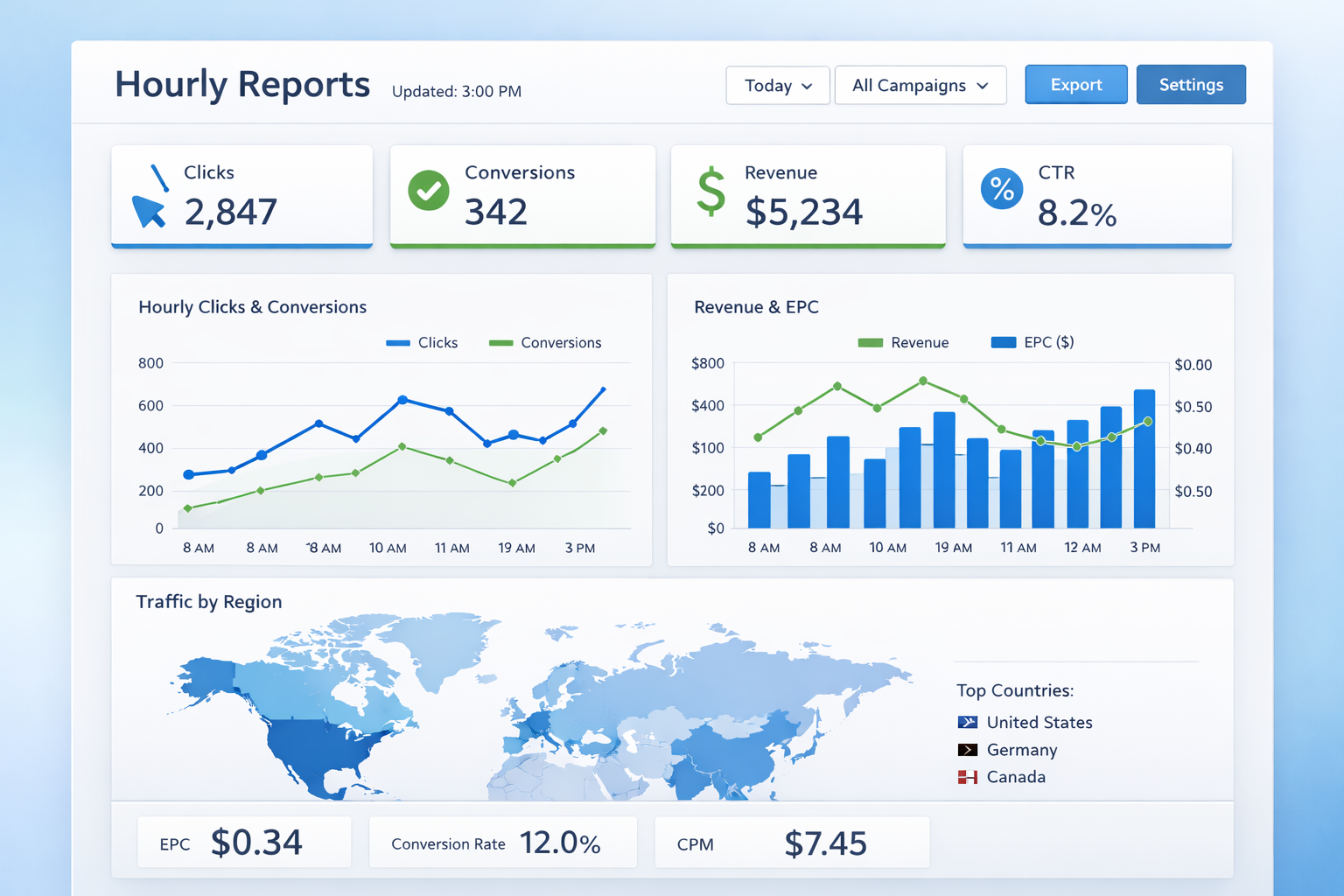
The Hourly Report provides a detailed breakdown of your affiliate program’s performance on an hour-by-hour basis for any selected day. This granular view helps you understand when your affiliates and campaigns are most effective.
Available Metrics
The hourly report tracks a comprehensive set of metrics for each hour of the day:
- Impressions: Total impressions, raw impressions, and unique impressions
- Clicks: Total clicks, raw clicks, and unique clicks
- Click-Through Rate (CTR): CTR calculations for all, raw, and unique traffic
- Sales Conversion Rate (SCR): Conversion rates for all, raw, and unique visitors
- Sales: Number of sales and total sale value
- Commissions: Total commissions and click commissions
- Signup Bonuses: Count and commission value
- Referral Bonuses: Count and commission value
- Affiliate Activity: New registrations and approvals per hour
- Refunds: Count, total value, and commission impact
Filtering Options
You can filter hourly reports by:
- Specific date selection
- Affiliate
- Campaign
This allows you to drill down into performance patterns for specific affiliates or campaigns throughout the day.
Monthly Reports
The Monthly Report aggregates your affiliate program data by month for any selected year, giving you a long-term view of performance trends and seasonal patterns.
Available Metrics
Monthly reports include all the same metrics as hourly reports, grouped by month:
- Impressions: All, raw, and unique impressions per month
- Clicks: All, raw, and unique clicks per month
- CTR and SCR: Performance ratios calculated monthly
- Sales: Monthly sales count and value
- Commissions: All commission types aggregated monthly
- Bonuses: Signup and referral bonuses per month
- Affiliate Growth: Monthly registration and approval counts
- Refunds: Monthly refund statistics
Time Period Analysis
The monthly view is particularly useful for:
- Identifying seasonal trends in your affiliate program
- Comparing year-over-year performance
- Planning promotional campaigns based on historical data
- Budgeting and forecasting commission expenses
Traffic Statistics
Traffic Statistics provide a consolidated view of your affiliate program’s traffic and conversion performance. This report aggregates data from impressions, clicks, and transactions to give you a complete picture of your funnel performance.
Key Metrics
The traffic statistics report displays:
- Total Impressions: Banner and link views across your affiliate network
- Total Clicks: Click counts with breakdown by type (raw, unique, declined)
- Total Sales: Combined sales and actions count
- Sales Value: Total monetary value of all conversions
- Total Commissions: Sum of all commissions generated
Data Breakdowns
Traffic data can be further analyzed by:
- Clicks Detail: All clicks, declined clicks, raw clicks, and unique clicks
- Impressions Detail: All impressions, raw impressions, and unique impressions
- Transaction Status: Approved, pending, declined, and paid transactions
- Transaction Values: Total cost, commission amounts by status
This comprehensive breakdown helps you identify traffic quality issues and optimize your affiliate recruitment strategy.
Channel Statistics
Channel Statistics allow you to analyze performance by the specific promotional channels your affiliates use. Channels are custom identifiers that affiliates assign to different traffic sources or marketing campaigns.
For each channel, you can track:
- Channel Name and Code: Identifying information for the traffic source
- Creation Date: When the channel was set up
- Impressions: All, raw, and unique impressions
- Clicks: All, raw, and unique clicks
- CTR: Click-through rates by type
- Sales and Commissions: Transaction counts and values
- Average Commission per Click: Efficiency metrics
Use Cases
Channel statistics are valuable for:
- Comparing performance across different traffic sources (social media, email, PPC, etc.)
- Identifying which promotional methods work best for your products
- Helping affiliates optimize their marketing strategies
- Detecting and investigating suspicious traffic patterns
The report includes a “No channel” category to aggregate traffic that hasn’t been assigned to a specific channel, ensuring all activity is accounted for.
Referrer Statistics
Post Affiliate Pro tracks referrer URLs to help you understand where your affiliate traffic originates. This data is captured in the clicks grid and can be filtered and analyzed.
- Referrer URL: The page that sent the visitor to your site
- Destination URL: The landing page the visitor arrived at
- Visitor ID: Unique identifier for tracking visitor journeys
- IP Address: Visitor location data
- User Agent: Browser and device information
Benefits
Referrer statistics help you:
- Verify that affiliates are promoting on approved channels
- Identify high-performing content and websites
- Detect potential fraud or policy violations
- Understand your customer journey better
Sub-affiliate Statistics
For programs using multi-tier commissions, the Sub-affiliate Statistics feature provides visibility into your affiliate network structure.
Available Data
The sub-affiliate report shows:
- Total Sub-affiliates: Complete count of all affiliates under a parent affiliate
- Direct Sub-affiliates: First-tier sub-affiliates only
- Tier-based Visibility: Configurable depth of tier visibility
Network Analysis
This feature helps you:
- Identify affiliates who are building strong networks
- Understand the depth and breadth of your affiliate structure
- Calculate multi-tier commission liabilities
- Reward top network builders appropriately
The sub-affiliate tree view provides a hierarchical visualization of your affiliate network, making it easy to navigate and understand relationships.
Financial Overview Reports
The Financial Overview provides affiliates and merchants with a summary of financial status and pending payouts.
Affiliate Financial Dashboard
Affiliates can view:
- Approved Commissions: Earnings ready for payout
- Pending Commissions: Earnings awaiting approval
- Minimum Payout Threshold: Required balance for payout
- Last Payment Date: When the previous payout was processed
Payment Request Feature
Affiliates can request payments directly through the financial overview, which:
- Sends notification to merchants
- Validates payout method is configured
- Prevents duplicate requests within the same month
Custom Report Options
Post Affiliate Pro offers extensive customization for reports to match your specific business needs.
Filtering Capabilities
All reports support filtering by:
- Date Range: Custom date selection or presets (today, this week, this month, this year)
- Affiliate: Filter to specific affiliates
- Campaign: Focus on particular campaigns
- Status: Filter transactions by approval status
Column Customization
You can customize which columns appear in reports based on your tracking needs. Available column types include:
- Standard metrics (impressions, clicks, sales)
- Currency values (commissions, totals)
- Percentage values (CTR, SCR)
- Count values (number of transactions)
- Date/time values
Custom Filter Fields
Advanced filtering options include:
- Visitor ID matching
- IP address filtering
- Extra data fields (data1, data2)
- Referrer URL patterns
- Country code filtering (with appropriate permissions)
Report Export Options
All advanced reports in Post Affiliate Pro can be exported for external analysis and record-keeping.
CSV Export
The primary export format is CSV (Comma-Separated Values), which:
- Includes all visible columns in the current report view
- Respects active filters
- Can be opened in Excel, Google Sheets, or any spreadsheet application
- Supports import into business intelligence tools
Export Process
To export any report:
- Configure your desired filters and column visibility
- Click the export button in the report interface
- The system generates a CSV file with your data
- Download the file for offline analysis
Best Practices
For optimal report exports:
- Apply date filters to limit data volume
- Select only necessary columns to reduce file size
- Schedule regular exports for historical record-keeping
- Use consistent filter settings for comparable reports over time
Integration with Other Features
Advanced reports integrate with other Post Affiliate Pro features:
- Trends Report: Complements advanced reports with visual charts
- Map Overlay: Adds geographic context to your data
- Audit Log: Tracks who accessed and exported reports
- API Access: Programmatic access to report data
Conclusion
Post Affiliate Pro’s advanced reporting suite provides the detailed analytics you need to optimize your affiliate program. From hourly performance breakdowns to comprehensive financial overviews, these reports give you visibility into every aspect of your affiliate marketing efforts. Combined with flexible filtering, customization, and export options, you have the tools to make data-driven decisions that improve program performance and ROI.