
How to Write Good Alt Text: Complete Guide for Web Accessibility and SEO
Learn how to write effective alt text for images. Discover best practices for accessibility, SEO optimization, and specific guidelines for different image types...
8 min read

Learn what good alt text looks like with practical examples. Discover best practices for writing concise, specific alt text that improves accessibility and SEO for your website.
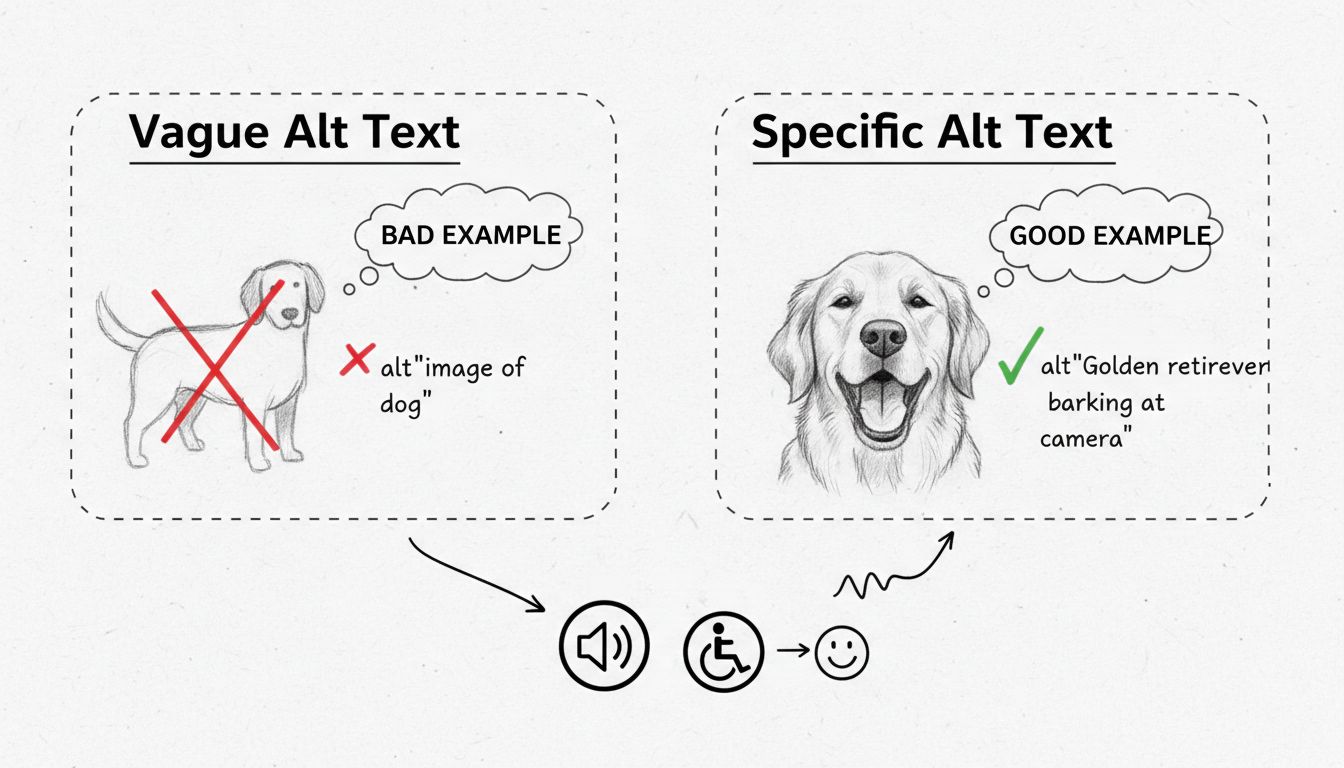
Good alt text is concise and specific. Instead of writing 'Image of a dog', write 'Dog barking'. Alt text should describe the relevant content and purpose of the image, not just its visual appearance, and typically ranges from 1-2 sentences.
Alt text, also known as alternative text, is descriptive text that conveys the meaning of an image in digital content. It serves as a critical bridge between visual content and users who rely on assistive technologies such as screen readers. When a person uses a screen reader, the technology reads the onscreen text aloud using text-to-speech technology, and when it encounters an image, it reads the alt text so the user can understand what the image is meant to convey. Without proper alt text, people who use screen readers cannot access the information provided in images, which is why alt text is a requirement in accessibility standards like Section 508 and WCAG guidelines.
Good alt text goes beyond simply describing what an image looks like—it communicates the purpose and context of the image within your content. The difference between poor and excellent alt text can significantly impact both accessibility and search engine optimization. For example, instead of writing “Image of a dog,” you should write “Golden retriever barking at camera” or “Dog barking” depending on the context. This specificity helps screen reader users understand not just that there is a dog in the image, but what action or state the dog is in, which is often the most important information for understanding the content.
Effective alt text possesses several essential characteristics that make it truly valuable for accessibility and SEO purposes. First and foremost, good alt text is concise and specific, typically ranging from one to two sentences. The goal is not to write a lengthy paragraph describing every detail of an image, but rather to capture the essential information that conveys why the image was included in your content. This means considering the context of where the image appears and what information is most relevant to the surrounding text.
Another critical characteristic is that good alt text avoids redundancy. If the image’s caption or the surrounding text already describes the image, your alt text should not duplicate that information. Instead, it should complement the existing content by providing additional context that screen reader users need to fully understand the image’s purpose. Additionally, good alt text should not include phrases like “image of” or “picture of” because screen readers automatically announce that an image is present. However, you should specify if the image is a logo, illustration, painting, cartoon, or diagram, as these distinctions provide important context.
| Alt Text Characteristic | Description | Example |
|---|---|---|
| Concise | 1-2 sentences maximum | “Group of college students walking on tree-lined pathway” |
| Specific | Describes relevant details and action | “Dog barking at camera” instead of “Dog” |
| Contextual | Relates to surrounding content | Alt text changes based on how the image is used |
| Non-redundant | Doesn’t duplicate captions or text | Complements rather than repeats information |
| Purposeful | Explains why the image was included | Focuses on meaning, not just appearance |
| Properly formatted | Ends with a period | “Hands holding corn stover, unused parts of harvested corn.” |
Different types of images require different approaches to alt text writing. For photographs, you should consider the specifics included in the image, such as names, proper nouns, locations, or action words. Think about why you chose that particular image and what you hope it will convey to your audience. For example, instead of writing “Group of people,” write “Group of young college students laugh and walk along a tree-lined pathway.” This provides much more meaningful information to screen reader users.
For icons and logos, the approach differs significantly. Logos are never decorative and always require alt text. You should describe any significant symbols or graphics and include any text in the logo word for word. For action icons, the alt text should describe the action intended by the icon, such as “Download Syllabus PDF” or “Search.” If an icon is being used as a link to another page, the alt text should describe what will happen when the icon is clicked, such as “Visit the Harvard Library Instagram.”
Illustrations and creative graphics require focusing on the intent of the image rather than specific details. If there is text included in the illustration, such as in a cartoon or screenshot of an application, you should describe both relevant visuals and the relevant text. For example, a cartoon might have alt text like: “Cartoon of a business man seated behind a desk interviewing a candidate in a suit who has scruffy hair and a long white beard. Text below reads ‘Mr. Crusoe, I’m concerned about this 20 year gap in your resume.’”
Diagrams, charts, and graphs require special attention because they often contain complex data. For these images, start your alt text with phrases like “Pie chart” or “Bar graph” to identify the type of visualization. Then describe important data trends, relationships, and other parts of the image that are being highlighted. If the image is very detailed and requires a longer description, include a short description in the alt text, then beneath the image provide a link to the data table or a longer description of the graphic. For example: “Bar chart of event sales for Monday through Friday showing a slight decline from Monday to Wednesday, with a dramatic increase to a peak on Friday.”
Many content creators make predictable errors when writing alt text that significantly reduce its effectiveness. One of the most common mistakes is writing alt text that is too short and doesn’t describe the relevant content of the image. While brevity is important, the alt text must still convey the essential information that makes the image meaningful in context. Another frequent error is writing alt text that is too long and describes unnecessary information, such as irrelevant details about people’s clothing or physical appearance unless those details are directly relevant to the content.
A critical mistake is writing text that visually describes the image but doesn’t describe the relevant content. For instance, if you have an image of a ramp helping wheelchair users, you should not write “A metal ramp with a wheelchair user in the background.” Instead, write something like “Wheelchair user ascending a metal ramp designed for accessibility.” This focuses on the purpose and meaning rather than just the visual appearance. Additionally, many creators make the error of repeating information from the main text in the alt text, which provides no additional value to screen reader users.
Another significant mistake is using computer-generated or AI-generated alt text without review. These automated descriptions often don’t communicate the actual purpose of the image. For example, an AI might describe a screenshot of a form as “Screenshot of a phone screen,” which is not helpful. Finally, some creators fail to translate alt text when translating content into other languages, or they use the image’s file name or path instead of a proper description, which provides no meaningful information to users.
The same image can require different alt text depending on how and where it is being used. This principle of contextual alt text is crucial for creating truly accessible content. Consider an image of Hollis Hall at Harvard University. If this image is used in an article titled “Spring is Here!” that highlights students enjoying nice weather and Luxembourg chairs being returned to Harvard Yard, the alt text should be: “Students lounge and work in brightly colored Luxembourg chairs in Harvard Yard.” However, if the same image is used in an article titled “Famous residents of Hollis Hall” that touches on the prime location of Hollis Hall in relation to common spaces, the alt text should be: “Hollis Hall, a red brick building, sits directly adjacent to the open grassy space of Harvard Yard.”
This demonstrates that effective alt text writing requires understanding the surrounding content and the specific purpose the image serves within that context. When writing alt text, always ask yourself: “What information does this image provide that is relevant to the article or page where it appears?” The answer to this question should guide your alt text, not a generic description of what the image looks like. This contextual approach ensures that your alt text provides maximum value to screen reader users while also improving your content’s relevance for search engines.
While alt text is primarily designed to make visual content accessible to people with vision disabilities, it provides numerous additional benefits that make it valuable for all users and for your website’s overall performance. Alt text is indexed by search engines and can significantly boost your site’s online presence and search engine optimization. Search engines use alt text to understand the content and context of images, which helps them index your pages more effectively and can improve your rankings for relevant search queries.
Alt text will display if the image fails to load, such as when users have slow internet connections or when images are blocked by their browser settings. In these situations, the alt text ensures that users can still understand what information the image was meant to convey. Additionally, alt text makes content accessible to users who may have difficulty understanding the meaning of visual content, and it makes visual content available for technical applications such as digital assistance and artificial intelligence. In 2025, as AI and machine learning continue to advance, properly written alt text becomes even more important for helping these systems understand and process your content correctly.
PostAffiliatePro helps you create accessible, high-converting affiliate marketing campaigns. Our platform supports best practices for web accessibility, including proper image optimization and alt text implementation, ensuring your content reaches all users and ranks better in search engines.
Learn how to write effective alt text for images. Discover best practices for accessibility, SEO optimization, and specific guidelines for different image types...
Alt text is a key component for both SEO and accessibility, helping search engines understand image content and enabling visually impaired users to access infor...
Learn how to optimize anchor text for SEO with proven strategies. Discover best practices for keyword placement, relevance, and natural language to improve rank...
Join our community of happy clients and provide excellent customer support with Post Affiliate Pro.



Cookie Consent
We use cookies to enhance your browsing experience and analyze our traffic. See our privacy policy.
