
Negative Keywords
Negative keywords allow advertisers to filter who will see their ads by preventing them from being triggered by certain searched words, optimizing ad spend and ...
6 min read
NegativeKeywords
AffiliateMarketing
+3

Learn how negative keywords reduce wasted ad spend, improve Quality Scores, and boost conversion rates in affiliate marketing campaigns. Complete guide with strategies.
Negative keywords improve affiliate marketing campaigns by filtering out irrelevant searches, reducing wasted ad spend on unqualified clicks, and focusing your budget on high-intent prospects. This leads to better Quality Scores, lower cost-per-click, higher click-through rates, and ultimately improved conversion rates.
Negative keywords are search terms that you explicitly exclude from triggering your affiliate ads. When you add a keyword to your negative list, your ads will not appear when users search for that term or related variations, depending on the match type you select. This strategic exclusion mechanism is fundamental to running profitable affiliate campaigns because it prevents your advertising budget from being wasted on clicks from users who are unlikely to convert. In the context of affiliate marketing, where every click directly impacts your profitability, negative keywords serve as a critical filter that separates qualified prospects from tire-kickers and bargain hunters who will never purchase the products or services you’re promoting.
The power of negative keywords lies in their ability to refine your audience targeting without requiring you to increase your overall ad spend. Instead of spending more money to reach better prospects, you’re simply redirecting your existing budget away from unqualified searches toward high-intent users. For example, if you’re promoting premium affiliate products, adding “free,” “cheap,” and “discount” as negative keywords ensures your ads don’t appear for budget-conscious searchers who have no intention of paying full price. This targeted approach transforms your campaigns from broad-based visibility plays into precision-targeted initiatives that deliver measurable results.
One of the most immediate benefits of implementing negative keywords is the dramatic reduction in wasted advertising spend. According to recent data, approximately 65% of businesses waste ad spend due to irrelevant clicks in their PPC campaigns. These wasted clicks represent money spent on users who will never convert, regardless of how compelling your ad copy or landing page might be. When you add negative keywords to your campaigns, you’re essentially creating a barrier that prevents your ads from appearing in front of these non-converting audiences, allowing your budget to be allocated exclusively to searches with genuine conversion potential.
Consider a practical example: if you’re an affiliate for high-end project management software, you might receive clicks from searches like “free project management tools,” “project management jobs,” or “project management training courses.” Each of these clicks costs you money, but none of them represent potential customers. Someone searching for free tools has already indicated they won’t pay for your affiliate product. Someone searching for jobs is looking for employment, not software. Someone searching for training is seeking educational content, not a purchase. By adding these terms as negative keywords, you eliminate these wasteful clicks entirely and redirect that budget toward searches from users actively looking to purchase premium project management solutions.
The financial impact compounds over time. If you’re currently spending $1,000 per month on ads and 30% of your clicks are from irrelevant searches, you’re effectively throwing away $300 monthly. Over a year, that’s $3,600 in wasted spend. By implementing a comprehensive negative keyword strategy, you could potentially recover a significant portion of that budget and redirect it toward qualified traffic, effectively increasing your campaign efficiency without increasing your overall advertising investment.
Google Ads and other advertising platforms use a Quality Score metric to evaluate the relevance of your ads to user search queries. This score directly impacts your cost-per-click (CPC) and ad placement. When your ads are shown for irrelevant searches, it signals to the platform that your ads lack relevance, which lowers your Quality Score. Conversely, when your ads consistently appear for highly relevant searches, your Quality Score improves, which can result in lower CPCs and better ad positions.
Negative keywords play a crucial role in maintaining and improving your Quality Score because they ensure that your ads are only shown for searches that closely align with your ad copy and landing page content. By filtering out irrelevant searches, you increase the proportion of relevant impressions in your campaign, which directly improves your Quality Score calculation. This creates a virtuous cycle: better Quality Score leads to lower CPC, which means your budget stretches further, allowing you to reach more qualified prospects with the same advertising investment.
| Metric | Impact of Negative Keywords |
|---|---|
| Quality Score | Increases by filtering irrelevant impressions |
| Cost-Per-Click (CPC) | Decreases due to improved relevance signals |
| Click-Through Rate (CTR) | Increases as ads appear for more relevant searches |
| Conversion Rate | Improves with higher-intent traffic |
| Return on Ad Spend (ROAS) | Increases through better budget allocation |
| Cost Per Acquisition (CPA) | Decreases with more qualified clicks |
The relationship between Quality Score and CPC is particularly important for affiliate marketers operating on thin margins. If you can reduce your CPC by even 15-20% through improved Quality Scores, the cumulative savings across hundreds or thousands of clicks can be substantial. For instance, if your current average CPC is $2.00 and you can reduce it to $1.70 through negative keyword optimization, you’re saving $0.30 per click. On a campaign that generates 10,000 clicks monthly, that’s a $3,000 monthly savings—money that can be reinvested in scaling your campaigns or improving your profit margins.
The ultimate goal of any affiliate marketing campaign is to generate conversions—whether that’s a sale, a lead, or a specific user action. Negative keywords directly contribute to this goal by ensuring that your ads are shown exclusively to users with high purchase intent. High-intent searches are those that indicate a user is actively looking to make a purchase or take a specific action, rather than simply researching or gathering information.
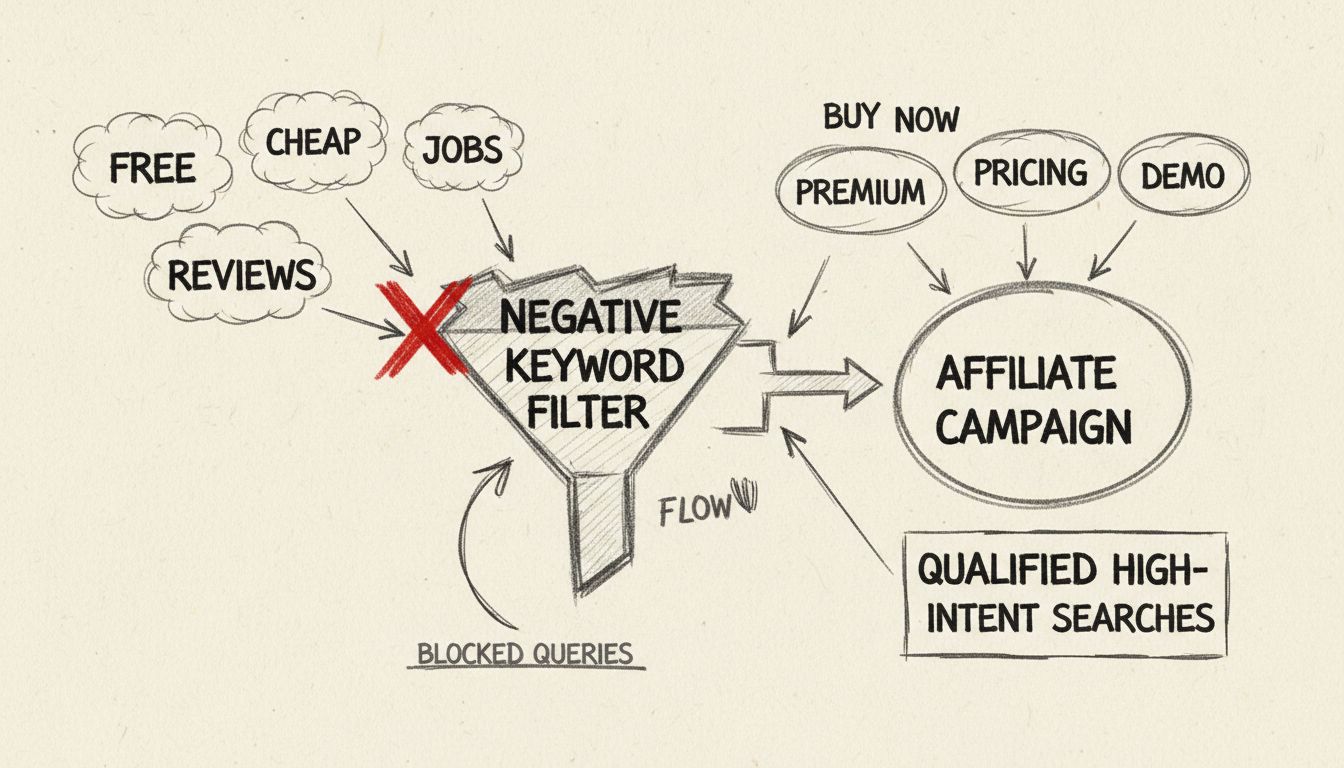
By excluding low-intent search terms, you naturally attract users who are further along in the buyer’s journey. For example, if you’re promoting an affiliate product, you might exclude terms like “reviews,” “opinions,” “how to,” and “tutorial” because these searches typically indicate users in the research phase rather than the purchase phase. Instead, your ads will appear for searches like “buy now,” “pricing,” “demo,” “free trial,” and “where to purchase,” which indicate users ready to take action. This fundamental shift in audience composition directly translates to higher conversion rates because you’re attracting prospects who are already motivated to make a purchase decision.
The conversion rate improvement from negative keywords can be dramatic. If your current conversion rate is 2% but you’re attracting a mix of high-intent and low-intent users, implementing negative keywords to filter out low-intent searches might improve your conversion rate to 3-4% or higher. This improvement occurs not because you’ve changed your ad copy or landing page, but simply because you’ve refined your audience to include only users with genuine purchase intent. For affiliate marketers, this means more revenue generated from the same advertising budget.
Negative keywords in Google Ads and similar platforms come in three distinct match types, each offering different levels of filtering precision. Understanding these match types is essential for implementing an effective negative keyword strategy because each type controls how broadly or narrowly your exclusions apply.
Broad Match Negative Keywords exclude a wide range of related search queries, including variations of your negative keyword. If you add “cheap” as a broad match negative keyword, your ads won’t show for searches like “cheap shoes,” “cheap sneakers,” “affordable shoes,” or any search containing the word “cheap” and related terms. This match type is ideal for blocking a broad category of irrelevant searches, such as when you’re promoting high-end products and want to avoid all budget-related searches. However, broad match negatives require careful management because they can inadvertently block some relevant searches. For instance, excluding “free” broadly might prevent your ads from appearing for “free trial” searches, which could represent high-intent prospects.
Phrase Match Negative Keywords block searches that include your exact phrase in the specified order, but allow other variations. If you add “cheap shoes” as a phrase match negative, your ads won’t show for “cheap shoes online” or “best cheap shoes,” but they could still appear for “affordable shoes” or “discounted shoes.” This match type provides a middle ground between broad and exact matching, offering more control than broad match while still filtering a reasonable range of related searches. Phrase match negatives are particularly useful when you want to exclude specific concepts without being overly restrictive.
Exact Match Negative Keywords exclude only the exact search term specified, without any variations. If you add “blue shoes” as an exact match negative, your ads won’t show only for that specific query. This match type is the most precise and is best for highly targeted campaigns where you want to exclude very specific search terms. Exact match negatives work well for niche products or when you’ve identified specific searches that consistently fail to convert and you want to block only those exact terms without affecting similar searches.
Creating an effective negative keyword list requires a systematic approach that combines data analysis, industry knowledge, and ongoing optimization. The most reliable source of negative keywords is your own campaign data, specifically your search terms report. This report shows the actual queries that triggered your ads and resulted in clicks. By analyzing this data, you can identify patterns of irrelevant searches that are wasting your budget. Look for searches that generated clicks but no conversions, or searches that clearly indicate low purchase intent.
Beyond your own data, you can identify negative keywords through several other methods. Competitor research can reveal search terms that competitors are targeting but that don’t align with your affiliate offering. Keyword research tools like SEMrush, Ahrefs, and Ubersuggest can help you discover keyword variations and related terms that might attract the wrong audience. Industry knowledge is also valuable—you understand your product category better than anyone, so you can anticipate which types of searches will attract unqualified prospects. For example, if you’re promoting professional software, you know that searches containing “student,” “free,” “tutorial,” or “training” likely represent low-intent users.
Once you’ve identified your negative keywords, organize them into logical categories or lists. Google Ads allows you to create shared negative keyword lists that can be applied across multiple campaigns, which is particularly useful if you’re running several affiliate campaigns in the same industry. Use clear naming conventions for your lists so you can easily identify what each list contains. For instance, you might create lists named “Low-Intent Terms,” “Job Seeker Searches,” “Competitor Brands,” and “Free Resource Seekers.” This organization makes it easier to manage your negative keywords over time and ensures consistency across your campaigns.
Implementing negative keywords in your affiliate campaigns is straightforward but requires attention to detail. In Google Ads, you can add negative keywords at two levels: the campaign level and the ad group level. Campaign-level negative keywords apply to all ad groups within that campaign, making them useful for broad exclusions that apply across your entire campaign. Ad group-level negative keywords apply only to specific ad groups, allowing you to fine-tune your exclusions for different product categories or audience segments.
To add negative keywords in Google Ads, navigate to the Keywords section of your campaign or ad group, select “Negative Keywords,” and add your terms one per line. You can specify the match type for each negative keyword, allowing you to mix broad, phrase, and exact match negatives within the same list. Many affiliate marketers use a combination of all three match types to achieve optimal filtering. For example, you might use broad match negatives for very common low-intent terms like “free,” phrase match negatives for specific phrases like “how to,” and exact match negatives for specific competitor names or product variations that you want to exclude.
Regular maintenance of your negative keyword lists is essential for long-term campaign success. Review your search terms report at least weekly to identify new negative keywords that should be added. As your campaigns run and you gather more data, you’ll discover new patterns of irrelevant searches that warrant exclusion. Additionally, periodically audit your existing negative keyword lists to ensure you’re not being overly aggressive with your exclusions. Sometimes a negative keyword that made sense early in your campaign might be blocking valuable traffic as your campaign evolves. By maintaining a balance between filtering out waste and remaining open to relevant traffic, you’ll optimize your campaigns for maximum profitability.
When managing negative keywords across multiple affiliate campaigns, having the right platform makes a significant difference. PostAffiliatePro offers superior campaign management capabilities that make negative keyword optimization seamless and efficient. Unlike basic affiliate platforms, PostAffiliatePro provides detailed tracking and reporting that helps you identify which keywords are driving conversions and which are wasting your budget.
PostAffiliatePro’s advanced analytics dashboard gives you visibility into every aspect of your affiliate campaigns, including detailed search term performance data. This transparency makes it easy to identify negative keyword opportunities and implement them quickly. The platform’s integration with major advertising networks ensures that your negative keyword strategies are implemented consistently across all your campaigns. Additionally, PostAffiliatePro’s team of affiliate experts can provide guidance on negative keyword best practices specific to your industry and product category, helping you optimize your campaigns faster than you could on your own.
The platform’s superior reporting capabilities also make it easier to measure the impact of your negative keyword implementations. You can track how your Quality Scores, CPCs, and conversion rates change as you refine your negative keyword lists, allowing you to make data-driven decisions about your optimization efforts. This level of insight is invaluable for affiliate marketers who need to maximize ROI on every advertising dollar spent.
PostAffiliatePro's advanced tracking and campaign management tools help you maximize ROI by identifying high-performing keywords and eliminating wasted spend. Manage negative keywords efficiently across all your affiliate campaigns with our intuitive platform.
Negative keywords allow advertisers to filter who will see their ads by preventing them from being triggered by certain searched words, optimizing ad spend and ...
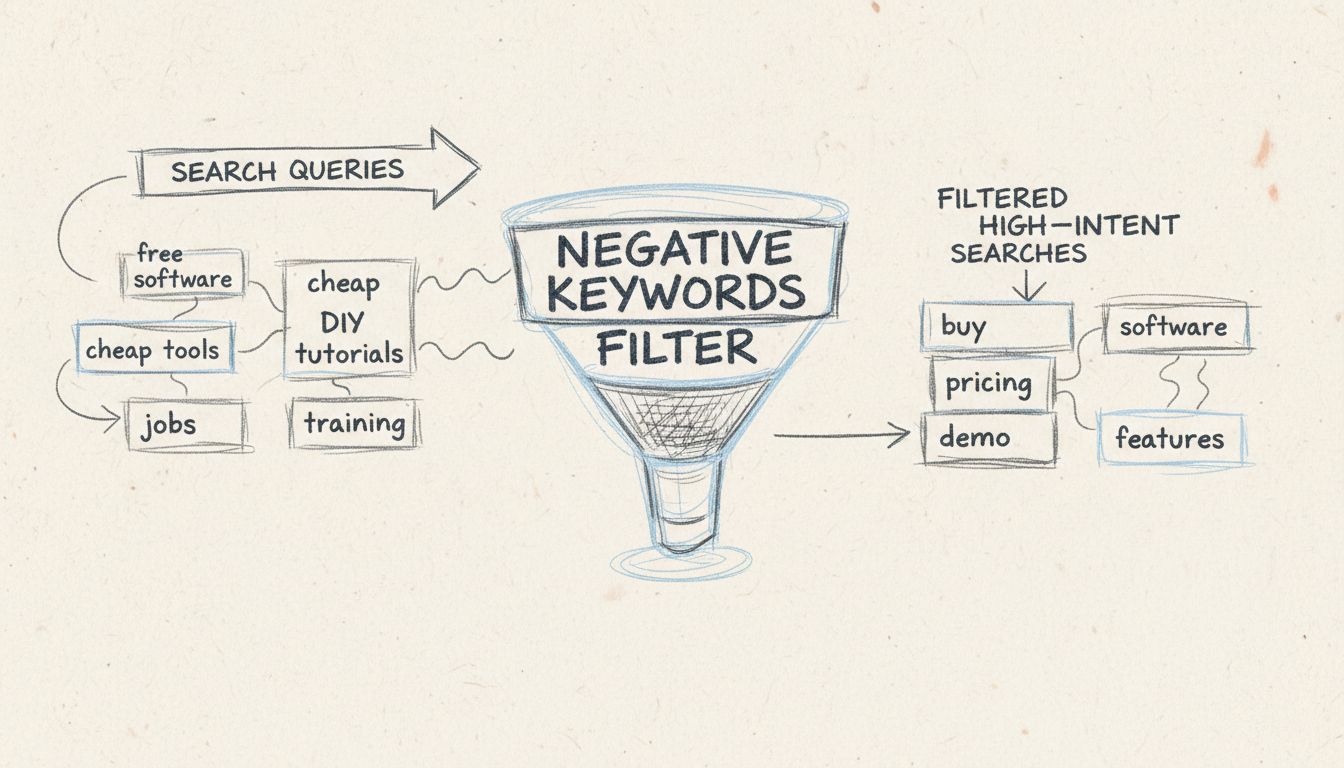
Learn what negative keywords are and how to use them to prevent ads from showing on irrelevant searches. Master negative keyword match types, implementation str...
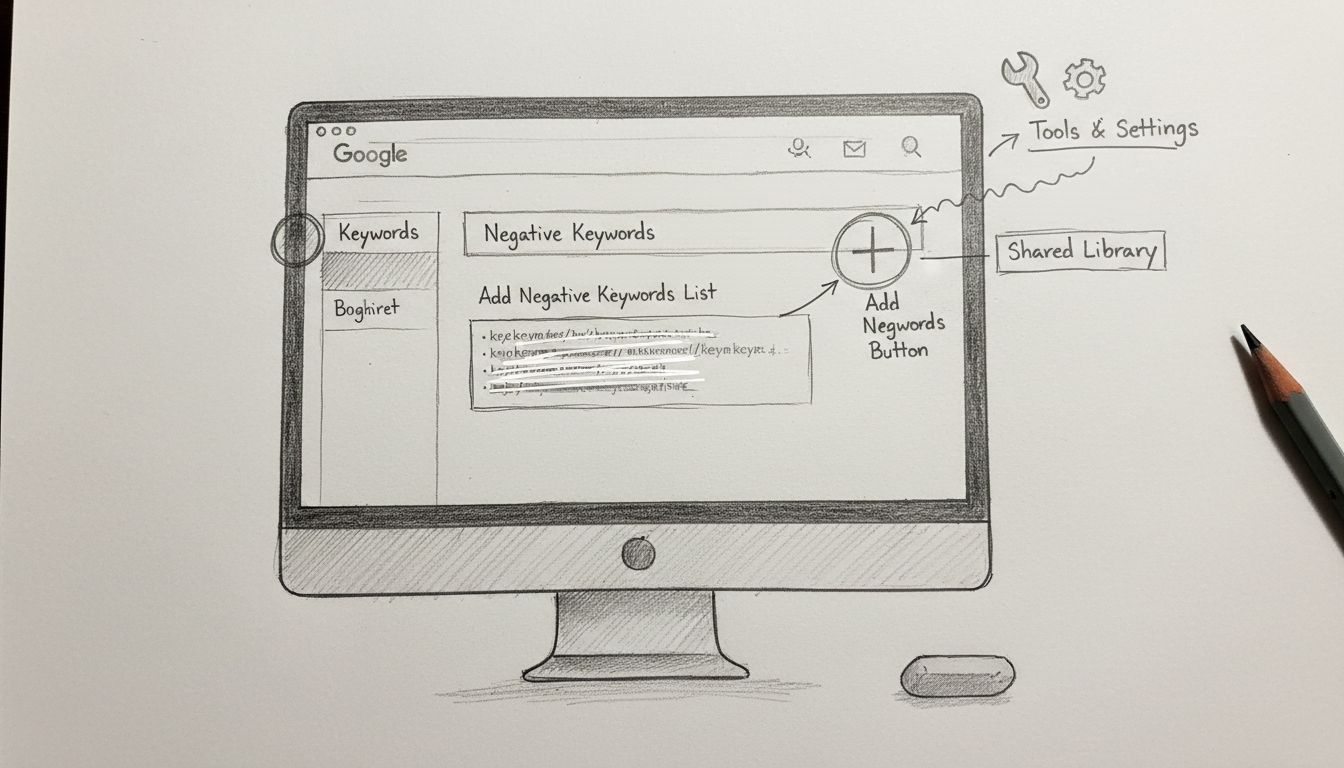
Learn how to add negative keywords in Google Ads to reduce wasted ad spend, improve targeting, and boost ROI. Step-by-step guide with match types and best pract...
Join our community of happy clients and provide excellent customer support with Post Affiliate Pro.




Cookie Consent
We use cookies to enhance your browsing experience and analyze our traffic. See our privacy policy.