

Optimize Affiliate Page Titles: Keywords, USP & Brand (55-70 Chars)
Master affiliate page title optimization with target keywords, unique selling propositions, and brand names. Learn the ideal 55-70 character length to maximize ...
7 min read

Learn the ideal title tag length for SEO. Discover why 50-60 characters is optimal, how Google displays title tags, and best practices to maximize click-through rates and rankings.
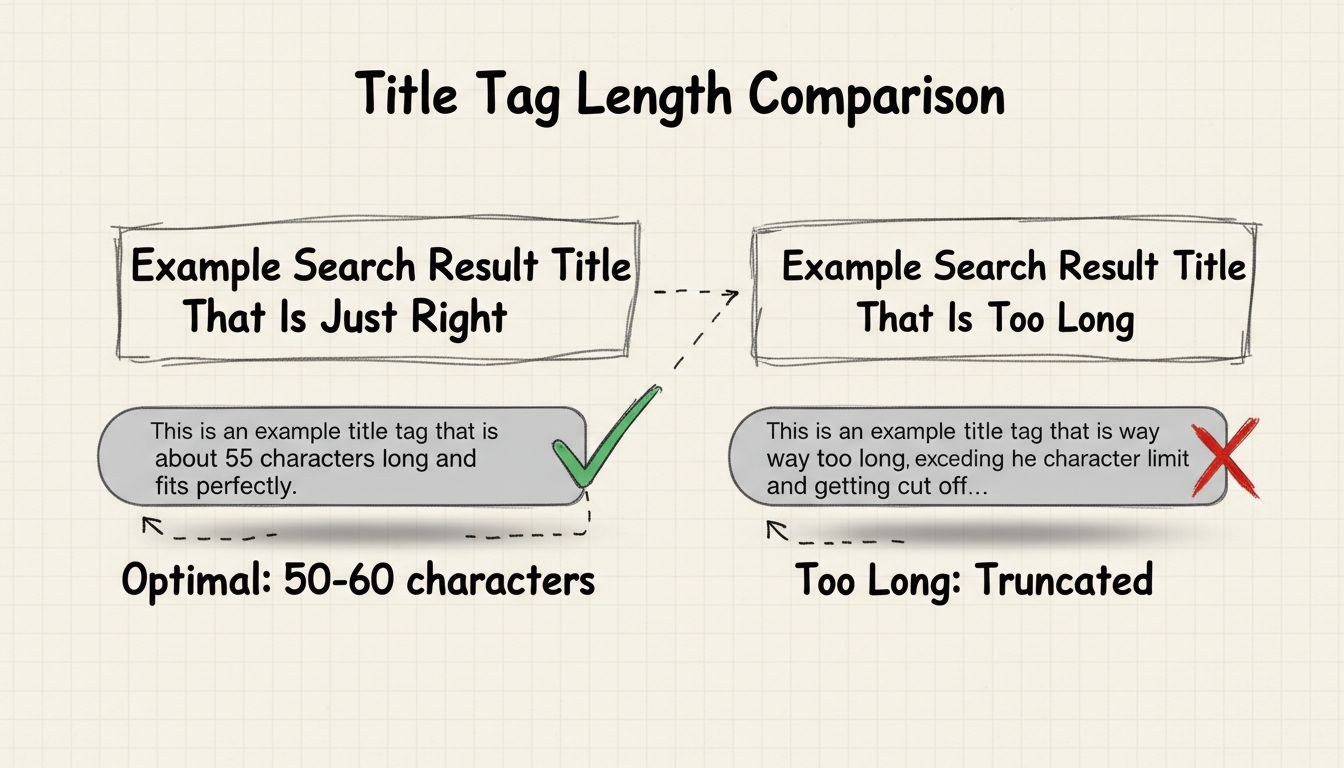
Title tags should be between 50 and 60 characters long to ensure they display fully in search engine results pages (SERPs) without truncation. This length allows you to include your target keyword, convey your message effectively, and improve both user experience and search engine rankings.
Title tags are one of the most critical on-page SEO elements that directly influence both search engine rankings and user click-through rates. The ideal title tag length is between 50 and 60 characters, which ensures your entire title displays properly across all devices and search engines. This character range has become the industry standard because Google and other search engines typically truncate titles that exceed 60 characters, replacing the overflow with an ellipsis (…). When your title tag gets cut off, users cannot see your complete message, which significantly reduces the likelihood they will click through to your website. By keeping your title tags within this optimal range, you maximize visibility, maintain message clarity, and improve your chances of earning valuable organic traffic.
The 50-60 character range represents the perfect balance between providing enough space to communicate your page’s value proposition and staying within the display limits of search engine results pages. This length typically translates to approximately 8-15 words, which is sufficient to include your primary target keyword, add context, and even incorporate your brand name when appropriate. Research from 2025 shows that Google shortens approximately 61% of all title tags that exceed the recommended length, meaning that if you ignore this guideline, there’s a significant chance your carefully crafted title will be rewritten or truncated by Google’s algorithm. The character limit exists because search engines need to maintain consistent formatting across their results pages, and longer titles would create visual inconsistency and poor user experience. Additionally, mobile devices have even smaller display areas than desktop screens, making the 50-60 character limit even more critical for mobile search visibility.
| Aspect | Details |
|---|---|
| Recommended Length | 50-60 characters |
| Minimum Length | 30 characters (below this, Google may rewrite your title) |
| Maximum Display | 60 characters on desktop, slightly less on mobile |
| Typical Word Count | 8-15 words |
| Google Truncation Rate | 61% of titles over 60 characters get shortened |
| Pixel Width Limit | Approximately 580 pixels on desktop |
| Mobile Consideration | Shorter titles perform better on mobile devices |
Google’s approach to title tags has evolved significantly, and understanding their current practices is essential for effective SEO optimization. While Google officially states there are no strict character limits for title tags, their actual behavior tells a different story. In August 2021, Google implemented a major update that allows them to rewrite your title tags if they determine your original title is too long, contains keyword stuffing, uses excessive boilerplate language, or doesn’t accurately reflect your page content. This means that even if you follow best practices, Google might still modify your title tag if their algorithm determines a different version would better serve users. The search engine prioritizes user experience above all else, so if your title tag is misleading, overstuffed with keywords, or contains repetitive elements, Google will likely replace it with either your H1 heading or a title they generate from your page content. This rewriting behavior has caused significant concern in the SEO community, as some websites have experienced traffic drops after Google rewrote their carefully optimized title tags. However, this also means you should focus on creating titles that are genuinely helpful and accurate rather than trying to game the system with keyword stuffing or excessive length.
Creating effective title tags requires a strategic approach that balances SEO optimization with user experience and readability. Your primary target keyword should appear near the beginning of your title tag, as this placement signals relevance to search engines and catches users’ attention immediately when they scan search results. Avoid keyword stuffing at all costs—including multiple variations of your keyword or cramming in unrelated keywords will trigger Google’s spam detection and may result in manual penalties or algorithmic suppression. Each page on your website must have a unique title tag, as duplicate titles confuse both search engines and users, potentially leading to cannibalization where multiple pages compete for the same keywords. Your title tag should accurately reflect the actual content on your page; misleading titles might generate initial clicks, but they result in high bounce rates that signal to Google that your page isn’t relevant to the search query. Consider incorporating emotional triggers or value propositions into your title when space allows—phrases like “Complete Guide,” “Step-by-Step,” “Best,” or “2025” can increase click-through rates by demonstrating the value users will receive. If you have a well-established brand, including your brand name at the end of your title tag can enhance recognition and trust, though this should only be done if you have sufficient character space remaining.
Title tag length directly affects your click-through rate (CTR), which is a crucial ranking factor in Google’s algorithm. When your title tag is truncated, users see an incomplete message that may not clearly communicate your page’s relevance to their search query, causing them to skip your result in favor of competitors with fully visible titles. Studies consistently show that pages with well-optimized, fully visible title tags receive significantly higher CTRs than those with truncated titles. The first 50-60 characters of your title are the most valuable real estate you have in search results, so you must prioritize your most compelling information in this space. Users typically scan search results quickly, spending only a few seconds deciding whether to click, so your title needs to immediately communicate relevance and value. A title that’s too short, on the other hand, may fail to convey sufficient context about your page’s content, leaving users uncertain about whether your page addresses their specific needs. The optimal approach is to front-load your most important keywords and value propositions within the 50-60 character range, ensuring that even if Google or a user’s browser truncates your title slightly, the essential message remains intact and compelling.
Many websites make critical errors when crafting title tags that undermine their SEO performance and user experience. One of the most common mistakes is creating generic, non-descriptive titles like “Home,” “Products,” or “Services”—these titles provide no context about what makes your page unique or relevant to specific search queries. Another frequent error is using brackets, pipes, or other special characters excessively; research shows that Google rewrites title tags containing brackets 77.6% of the time and replaces or eliminates pipes 41% of the time, so if you must use separators, parentheses and dashes are safer alternatives. Keyword stuffing remains a persistent problem, with many websites attempting to cram multiple keywords into their title tags in hopes of ranking for more search terms; this strategy backfires because it makes titles unreadable and triggers Google’s spam detection. Failing to align your title tag with your H1 heading creates confusion for both users and search engines about your page’s primary topic. Some websites make the mistake of including their brand name on every single title tag, even when it’s not relevant or when space is limited—your brand name should only be included when it adds value and you have sufficient character space. Additionally, many sites neglect to update their title tags regularly; as your content evolves and search trends change, your title tags should be reviewed and updated to maintain relevance and competitiveness.
While title tags and H1 headings are often confused, they serve distinct purposes in your SEO strategy and user experience. Your title tag appears in search engine results pages, browser tabs, social media shares, and messaging apps—it’s the first thing users see when they encounter your page in search results. Your H1 heading, by contrast, appears at the top of your actual web page and is the primary headline users see when they land on your site. Although these elements serve different purposes, they should work together cohesively to communicate your page’s topic and value proposition. Your title tag can be more concise and keyword-focused (staying within 50-60 characters), while your H1 heading can be longer and more descriptive since it doesn’t face the same display constraints. Google sometimes uses your H1 heading as a replacement for your title tag in search results, particularly if your title tag is too long, contains keyword stuffing, or doesn’t accurately reflect your page content. This is why it’s important to optimize both elements—if Google decides to rewrite your title tag, you want your H1 heading to be compelling and relevant enough to serve as an effective replacement. The best practice is to ensure your title tag and H1 heading share the same primary keyword and core message, creating consistency that helps both search engines and users understand your page’s purpose.
Accurately measuring your title tag length is essential to ensure you’re staying within the optimal 50-60 character range. Several free tools can help you check your title tag length, including Google’s Search Results Simulator, character counters, and SEO audit tools like Screaming Frog. When measuring, remember that you’re counting characters, not words—spaces and punctuation marks count toward your total character count. It’s important to test how your title tags appear across different devices and search engines, as display widths can vary slightly. You should also monitor your title tags’ performance over time by tracking metrics like click-through rate, impressions, and average position in Google Search Console. If you notice that certain title tags are underperforming, consider testing variations to see if adjusting the length, keyword placement, or value proposition improves results. A/B testing different title tag approaches can provide valuable insights into what resonates with your target audience and drives higher engagement. Additionally, regularly audit your existing title tags to identify opportunities for improvement—pages that are ranking well but have low CTRs might benefit from more compelling or descriptive title tags that better communicate their value to searchers.
As we move through 2025, the fundamental best practice of keeping title tags between 50-60 characters remains unchanged, despite ongoing discussions in the SEO community about whether this guideline is still relevant. While some SEO professionals argue that you should prioritize ranking over character count, the data consistently shows that staying within the 50-60 character range provides the best balance of visibility, click-through rate, and search engine compatibility. Google’s continued truncation of longer title tags at approximately 60 characters confirms that this limit remains a practical constraint, even if it’s not a hard technical requirement. The rise of mobile search has actually reinforced the importance of shorter, more concise title tags, as mobile screens display even fewer characters than desktop browsers. Additionally, the emergence of AI-powered search engines and answer engines like Perplexity AI has made clear, concise title tags even more important for standing out in diverse search environments. The best approach for 2025 is to view the 50-60 character guideline not as a rigid rule but as a proven best practice that maximizes your visibility and click-through potential across all search platforms and devices. Focus on creating title tags that are compelling, keyword-relevant, and accurately descriptive within this range, and you’ll position your pages for optimal search performance.
PostAffiliatePro's advanced SEO tools help you craft perfectly optimized title tags that drive higher click-through rates and improve your affiliate marketing performance. Get expert-level title tag optimization built into your affiliate management platform.
Master affiliate page title optimization with target keywords, unique selling propositions, and brand names. Learn the ideal 55-70 character length to maximize ...
Learn how title tags impact SEO performance, affect search engine rankings, and drive click-through rates. Discover best practices, common mistakes, and optimiz...

Learn how to boost YouTube affiliate earnings with rich tags, engaging thumbnails, audience engagement, consistent posting, and retention analytics. Optimize yo...
Join our community of happy clients and provide excellent customer support with Post Affiliate Pro.



Cookie Consent
We use cookies to enhance your browsing experience and analyze our traffic. See our privacy policy.