Auto-Approve in Affiliate Marketing
Auto-approve is an affiliate marketing feature where all affiliate applications are directly accepted upon submission, streamlining recruitment and enabling rap...
3 min read
AffiliateMarketing
Automation
+3

Learn how to disable automatic affiliate activity checking for selected affiliates in Post Affiliate Pro. Manage monitoring settings, configure exceptions, and optimize your affiliate program management in 2025.
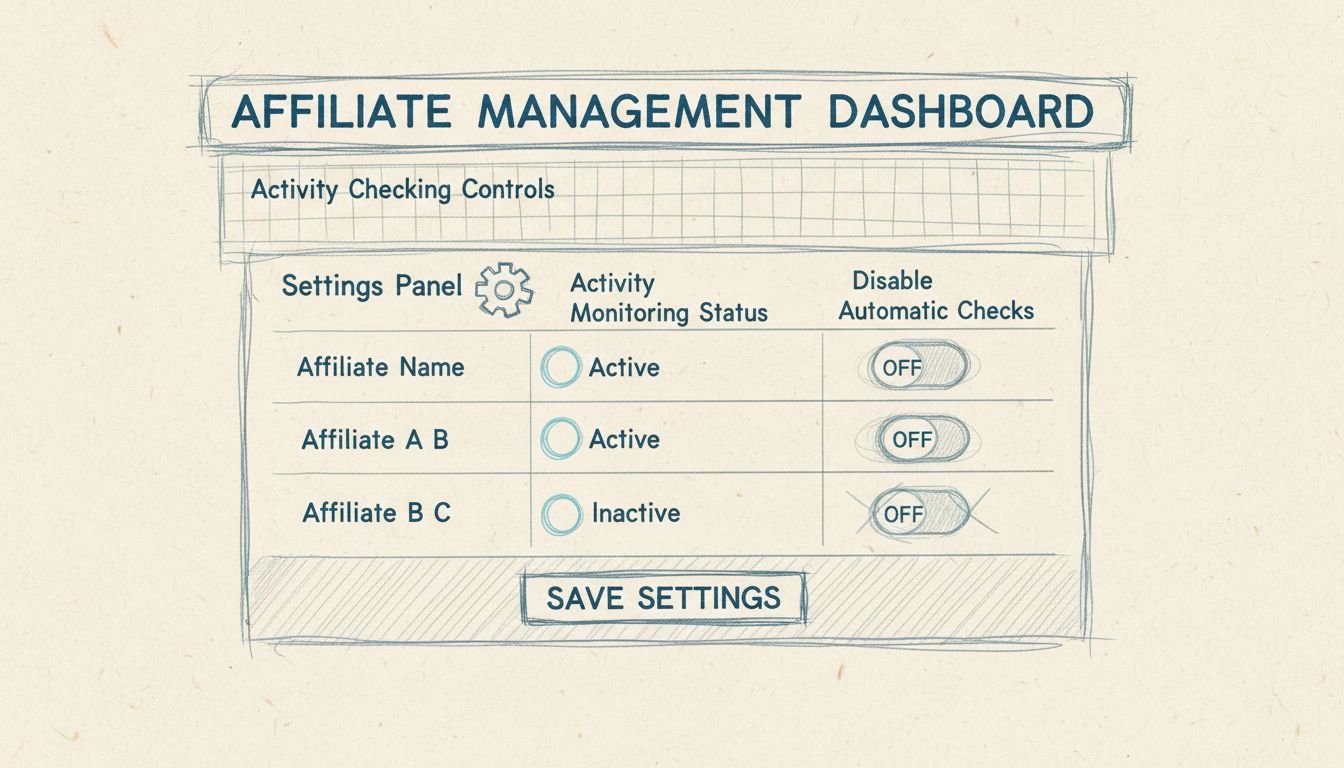
Yes, you can disable automatic affiliate activity checking for selected affiliates. Post Affiliate Pro allows you to configure activity monitoring settings on a per-affiliate basis, giving you granular control over which affiliates are subject to automatic activity checks and which ones are exempt from this monitoring.
Automatic affiliate activity checking is a critical feature in modern affiliate management systems that monitors the performance and behavior of your affiliates in real-time. This functionality helps merchants identify inactive affiliates, detect fraudulent activities, and ensure compliance with program guidelines. However, not all affiliates require the same level of monitoring, and some trusted partners may need exemptions from automatic checks to avoid unnecessary restrictions or false positives. Post Affiliate Pro recognizes this need and provides comprehensive tools to customize activity monitoring on a per-affiliate basis, allowing you to maintain program integrity while respecting the needs of your most valuable partners.
There are several legitimate reasons why you might want to disable automatic activity checking for specific affiliates. Trusted long-term partners who have demonstrated consistent performance and reliability may not require the same level of scrutiny as new affiliates. High-volume affiliates with legitimate traffic patterns that might trigger false positives in automated systems benefit from exemptions that prevent unnecessary account restrictions. Affiliate networks and agencies that manage multiple sub-affiliates often need different monitoring rules than individual marketers. Additionally, affiliates with unique business models such as offline marketers, corporate partners, or white-label resellers may have activity patterns that don’t align with standard automated checks. By selectively disabling automatic activity checking, you can reduce administrative overhead, prevent legitimate affiliates from being flagged incorrectly, and maintain stronger relationships with your most important partners.
Post Affiliate Pro provides an intuitive interface for managing affiliate activity checking settings. To disable automatic activity checking for a specific affiliate, navigate to the Affiliate Management section of your dashboard and locate the affiliate whose monitoring settings you wish to modify. Once you’ve selected the affiliate, access their Settings or Profile page where you’ll find the activity monitoring configuration options. Look for the Automatic Activity Checking toggle or checkbox, which is typically located in the advanced settings section. When you disable this option for a particular affiliate, the system will exclude them from automated activity monitoring processes while maintaining all other tracking and reporting capabilities. This means their clicks, impressions, and conversions will still be recorded and tracked, but they won’t be subject to automatic flags or restrictions based on activity thresholds. After making your changes, ensure you click the Save or Update button to apply the new settings immediately.
When managing automatic activity checking settings, Post Affiliate Pro offers several configuration options to suit different affiliate management strategies. You can disable automatic checking entirely for an affiliate, or you can customize specific monitoring parameters such as activity thresholds, inactivity periods, and fraud detection sensitivity levels. Best practice recommendation: Create a tiered approach to affiliate monitoring based on affiliate status and performance history. For example, you might maintain automatic checking for new affiliates during their first 90 days, then disable it for those who demonstrate consistent performance and compliance. This approach balances program security with affiliate satisfaction and retention.
| Affiliate Category | Automatic Checking Status | Recommended Approach | Monitoring Alternative |
|---|---|---|---|
| New Affiliates (0-90 days) | Enabled | Monitor closely for compliance | Weekly manual reviews |
| Established Affiliates (90+ days) | Can be Disabled | Trust-based approach | Monthly performance reports |
| High-Volume Partners | Disabled | Manual oversight | Dedicated account manager |
| Affiliate Networks | Disabled | Custom agreements | Quarterly audits |
| Underperforming Affiliates | Enabled | Active monitoring | Performance improvement plans |
Disabling automatic activity checking doesn’t mean abandoning oversight of your affiliates. Post Affiliate Pro provides robust manual monitoring tools that allow you to maintain visibility without relying on automated systems. The Affiliate Report feature gives you comprehensive insights into each affiliate’s performance metrics, including clicks, impressions, conversions, and commission earnings. You can generate custom reports filtered by date range, campaign, or specific affiliates to identify trends and potential issues. The Top Affiliates Report helps you track your best performers and identify which partners are driving the most value. Additionally, the Trends Report displays performance data in visual charts and graphs, making it easy to spot anomalies or changes in affiliate behavior. For more detailed analysis, the Audit Log feature provides a chronological record of all activities within your affiliate program, allowing you to investigate specific transactions or account changes when needed.
Beyond basic activity checking, Post Affiliate Pro includes advanced fraud protection and monitoring capabilities that work independently of automatic activity checking settings. The Fraud Protection Feature monitors all transactions generated in the system and can flag suspicious patterns such as unusual conversion rates, geographic anomalies, or rapid transaction clustering. This system operates separately from affiliate-specific activity checking, meaning you can disable automatic activity monitoring for trusted affiliates while maintaining fraud detection across your entire program. The Map Overlay Report allows you to filter transactions by country and set up geographic fraud protection rules, which is particularly useful for identifying suspicious activity patterns based on location data. The SubID/Ad Channels Tracking feature provides granular visibility into how each affiliate is driving traffic, allowing you to identify which marketing channels and campaigns are performing well and which might require investigation.
Developing a clear policy for when to disable automatic activity checking helps ensure consistency and fairness across your affiliate program. Start by defining criteria for affiliate exemption, such as minimum tenure in the program, minimum monthly commission earnings, or demonstrated compliance history. Document these criteria in your affiliate agreement so affiliates understand the requirements for receiving monitoring exemptions. Communicate with your affiliates about the benefits of maintaining automatic checking for new partners—it protects both the merchant and the affiliate by preventing fraudulent activity that could damage the program’s reputation. For affiliates who qualify for exemptions, explain that while automatic checking is disabled, you maintain the right to conduct manual reviews and investigations if suspicious activity is detected. This transparent approach builds trust while protecting your program’s integrity.
When disabling automatic activity checking for certain affiliates, it’s important to maintain appropriate risk management practices. Even for trusted partners, you should establish a schedule for periodic manual reviews of their activity and performance metrics. Consider implementing a re-evaluation schedule where you review exemption status quarterly or semi-annually to ensure affiliates continue to meet your criteria. Maintain detailed documentation of which affiliates have automatic checking disabled and the business justification for each exemption. This documentation is valuable for compliance purposes and helps you defend your affiliate program management practices if questions arise. Additionally, ensure that your fraud detection systems remain active for all affiliates, regardless of automatic activity checking status. Post Affiliate Pro’s fraud protection features operate independently and provide an additional layer of security that catches suspicious patterns even when automatic activity monitoring is disabled for specific partners.
When you disable automatic activity checking for an affiliate, you should establish alternative monitoring methods to ensure they remain compliant and productive. Set up custom alerts in Post Affiliate Pro to notify you of significant changes in an affiliate’s performance, such as sudden spikes in conversion rates or unusual traffic patterns. Use the Quick Report feature to get a rapid overview of all tracked events including impressions, clicks, sales, and commissions for your exempted affiliates. Schedule regular performance reviews where you analyze each affiliate’s metrics against their historical performance and industry benchmarks. This proactive approach allows you to identify potential issues before they become problems while respecting the autonomy of trusted partners. The Online Users Report shows in real-time who is logged into your installation, which can help you monitor when affiliates are actively managing their accounts and campaigns.
Disabling automatic affiliate activity checking for certain affiliates is a powerful feature that Post Affiliate Pro provides to give you granular control over your affiliate program management. By selectively exempting trusted, high-performing partners from automatic monitoring while maintaining robust manual oversight and fraud detection capabilities, you can optimize your program for both security and affiliate satisfaction. The key to successful implementation is establishing clear criteria for exemptions, maintaining alternative monitoring methods, and regularly reviewing your policies to ensure they continue to serve your program’s objectives. Post Affiliate Pro’s comprehensive suite of reporting, tracking, and fraud protection tools ensures that you never sacrifice visibility or security, even when disabling automatic activity checking for specific affiliates. Whether you’re managing a small affiliate program or a large network with hundreds of partners, the flexibility to customize monitoring settings on a per-affiliate basis allows you to create a program that works for your unique business needs.
Post Affiliate Pro's advanced affiliate management features give you complete flexibility to customize activity checking rules for each affiliate. Disable automatic monitoring for trusted partners, set custom thresholds, and maintain full visibility over your program with our intuitive dashboard.
Auto-approve is an affiliate marketing feature where all affiliate applications are directly accepted upon submission, streamlining recruitment and enabling rap...
Learn how PostAffiliatePro's Audit Log feature tracks all affiliate program activities, ensures compliance, and provides complete transparency for accountabilit...
Understand how affiliate sign-up approval works in Post Affiliate Pro, including manual and automatic approval options, configuration steps, and best practices ...
Join our community of happy clients and provide excellent customer support with Post Affiliate Pro.



Cookie Consent
We use cookies to enhance your browsing experience and analyze our traffic. See our privacy policy.